Construction runs on proof.We deliver it.

Digital Foreman helps contractors reduce costly mistakes, save crews time, and streamline office ops. It still works when the field has no signal.

Built for contractor field teams

$100 per seat per monthGuided setup support. Core launch help included.

  • Offline capture

    Queues work until sync.

  • NOAA weather

    Support warranty reviews.

  • Bid access controls

    Tenant-scoped access controls.

What sets us apart

Review $$$
Review costly risk
Queued
Sync with reviewable state
NOAA
Weather data when available

Intelligent systems that support your business

While others charge extra for basic features, Digital Foreman builds review workflows into the platform so teams can organize time, money, and paperwork decisions.

  • Queued sync review

    The problem teams face: Sync crashes can wipe out days of crew time entries in an instant. Jobsite photos and daily reports disappear when crews need them most.

    How we help: Queued batching keeps sync reviewable so crew time entries, photos, and jobsite updates show visible pending state.

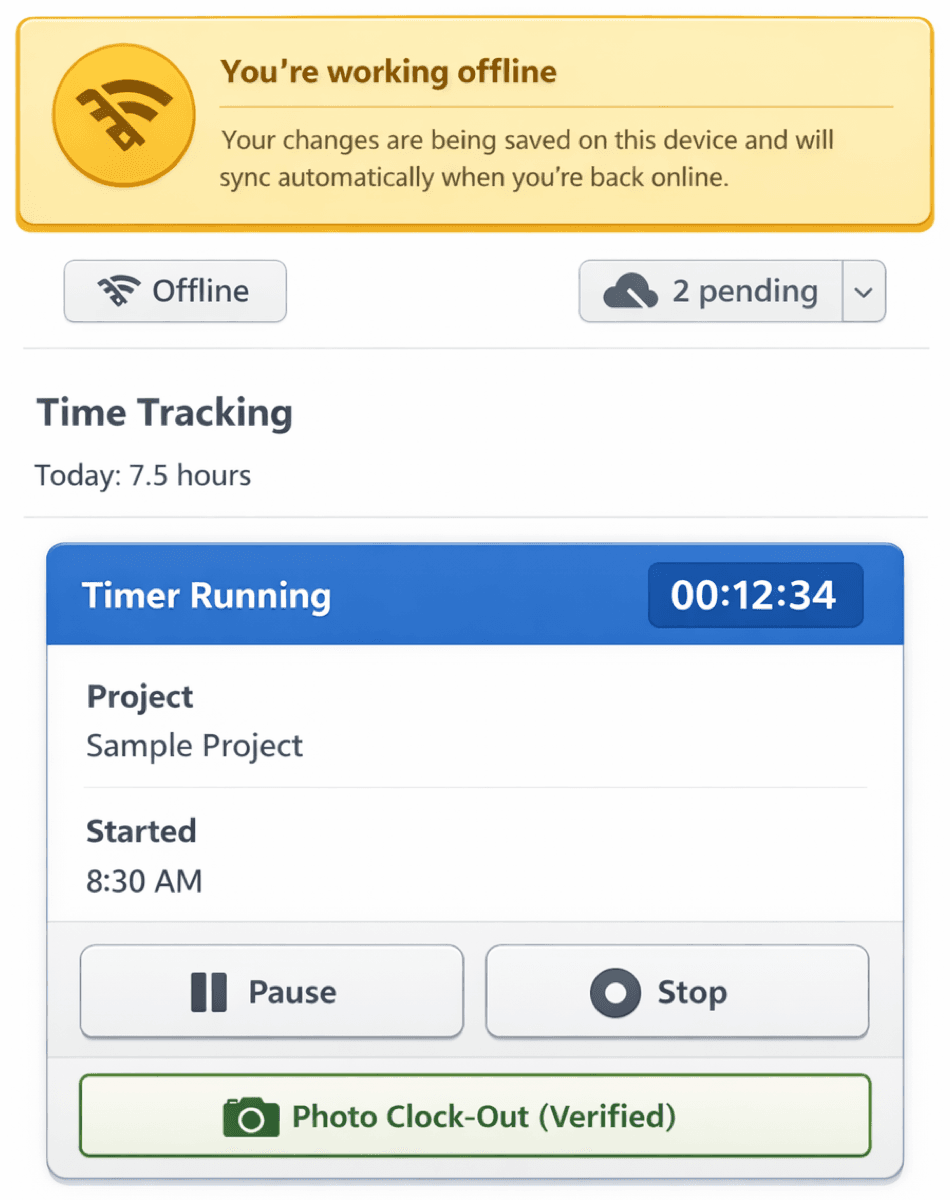
    Queued sync keeps pending work visible in dead zones
  • Bid privacy

    The problem teams face: Shared systems can expose confidential bid documents and pricing when security boundaries are weak.

    How we help: Role-based access controls with tenant-aware isolation help limit bid, pricing, and strategy access by role and organization.

    Tenant-aware controls reduce confidential bid exposure

  • Documentation workflows

    The problem teams face: Warranty claims get harder to defend when contractors cannot document weather conditions at install time.

    How we help: NOAA/NWS weather documentation can be saved with jobsite evidence and timestamped records when provider data is available.

    Reduce warranty review risk from missing documentation

  • Material-condition review

    The problem teams face: Installing materials outside manufacturer temperature specs can void warranties and create expensive rework.

    How we help: Configured alerts warn crews when conditions fall outside spec, helping them stop risky installs before they cost money.

    Review warranty-sensitive conditions before work proceeds

  • Payroll review support

    The problem teams face: Time entry changes can vanish during sync conflicts, triggering payroll disputes and crew distrust.

    How we help: Retained audit history captures before-and-after snapshots for changes so payroll disputes can be reviewed with context.

    Defend payroll reviews with retained change history

  • Equipment tracking and billing

    The problem teams face: Manual tracking leads to billing errors, customer disputes, and hard-to-defend job records.

    How we help: GPS and timestamp context can support equipment-location review and customer billing.

    Support billing review with timestamped context

One app that handles leads, estimates, daily logs, and invoicing

Stop juggling multiple tools. Digital Foreman keeps your office and crews aligned in one intuitive platform built for roofers, remodelers, and contractors who value convenience, common sense, and modern tools.

Construction management platform for field teams

Offline capture workflows, provider-backed weather context, and construction-specific workflows keep field crews and office teams aligned. Health checks, testing infrastructure, and governed documentation workflows stay included.

Sync Recovery Gaps

The Problem

When systems fail during sync, time entries and jobsite data need a clear recovery path. Teams need reviewable records after low-signal work.

Our Solution

Queued batching saves data locally first, then syncs when ready. Queued records stay reviewable even in dead zones.

Finn, the Digital Foreman mascot

Ready to see Digital Foreman in action?

Start your 7-day free trial or review launch pricing to see how quickly your team can get live. Card required to start. Launch terms are listed up front.

See Digital Foreman in action

Click any feature to see how it works in the field and office

Offline time entry screen with "Will sync when online" badge
Illustrative Product Preview

Offline capture

Queued capture in dead zones

Your foreman clocks in at a remote jobsite with limited connectivity. Supported taps, photos, and notes save locally. When connectivity returns at lunch, queued work syncs with visible pending state and reviewable exceptions.

Key Features:

1

Local device storage for queued work

2

Queued batching with visible batch limits

3

Queue management shows what's pending

4

Conflict resolution if two devices edit same item

Convenience, common sense & cutting-edge technology

Digital Foreman helps contractors review costly mistake risk, support field teams, and streamline office operations when field connectivity is limited. We bring together construction expertise and technical innovation to build software that fits contractor workflows.

Field records workflow

Queued capture with bounded batching and visible sync review

  • Queued capture with visible pending sync status
  • Timestamped weather documentation for warranty review when providers are configured
  • Tenant-scoped access controls to help keep bids confidential
  • Retained audit history for time tracking and payroll review

Software built to solve problems

Digital Foreman was founded after recognizing critical gaps in existing construction software while working in the industry.

We've seen costly sync failures leave time entries and team records difficult to recover without a clear review path.

We've watched businesses struggle with warranty claim challenges caused by missing weather documentation, security gaps that can expose confidential bids, and payroll disputes caused by missing time entry records.

These risks can be reduced with better workflows.

We built Digital Foreman to support these real-world construction review points.

Digital Foreman provides:

  • Queued capture with visible pending sync status
  • Timestamped weather documentation for warranty review when providers are configured
  • Tenant-scoped access controls to help keep bids confidential
  • Retained audit history for time tracking and payroll review
  • Queued

    Queued capture

    Capture with limited connectivity

  • Reviewed

    From common losses

    Data, warranty, and security risk signals

  • Visible

    Sync review

    Pending status for queued records

  • Provider

    Weather updates

    Configured weather context

Why Digital Foreman is different

  • Built for real jobsites

    Designed for offline capture, harsh weather, and teams who need simple, reliable tools.

  • Solves costly problems

    Helps teams review data-loss risk, warranty records, and payroll disputes before they become expensive fire drills.

  • No fluff features

    Each workflow focuses on a costly field or office review point. No bells and whistles you do not need.

See complete pricing breakdown

Compare launch pricing against AccuLynx, JobNimbus, and Buildertrend.

Choose the best next step for your team

Start a trial, book a guided demo, talk through your questions, or estimate your annual investment. Every path is built for contractors, not generic software buyers.

  • Start free trial

    Get hands-on access

    7 daysCard required to start

    Launch Digital Foreman with guided setup and see how it fits your real workflows.

    • Live app access right away
    • Setup help included
    • Use it on any device
    • Cancel anytime
    Start free trial
  • Talk to an expert

    Get answers fast

    15 minutesNo pressure

    Quick call with someone who understands contractor workflows and can answer your specific questions.

    • Talk through your exact situation
    • Get practical answers, not a canned pitch
    • Same-day or next-day availability
    • Helpful even if you are still comparing tools
    Schedule call
  • Most popular

    Schedule a demo

    See the real workflows

    Under 30 minutesNo pressure

    Walk through offline capture, weather documentation, scheduling, and payroll-review flows with your team’s priorities in mind.

    • See the workflows live
    • Bring your actual field questions
    • Review rollout and onboarding support
    • Decide whether a free trial is the right next step
    Schedule demo
  • Calculate ROI

    Estimate your investment

    2 minutesJust curious

    Estimate annual platform cost based on team access needs and review what is included.

    • Based on your team size
    • Simple flat-fee math
    • Includes the core platform scope
    • No email gate required